A quick heads-up: this page is an independent guide. We're not LTO, we can't see your records, and nobody here will ever ask for your password or a payment. Want the steps first? Keep reading.
What the LTMS portal is, and what changed in 2026
The LTMS portal is LTO's official website for drivers and vehicle owners in the Philippines.
One free account at portal.lto.gov.ph holds your LTO Client ID, your digital driver's license, your violations and demerit points, and online applications for licenses and vehicle registration.
LTMS stands for Land Transportation Management System. "LTO portal", "LTMS online portal" and "portal LTO" all mean the same website. If a search result points you somewhere other than portal.lto.gov.ph, stop and do the fake-site check first.
The menu along the top is mostly icons, which isn't obvious the first time:
- Graduation cap ▾: E-Learning. This holds the CDE exam, the renewal course and the Driver's Manual.
- Phone: Contact
- Person with a plus sign: Register
- Person: Log in. Once you're signed in, a house icon (Home) appears and the person icon becomes your account menu.
Stradcom is out. Here's what that means for you
Since 10 September 2026, every LTO office processes transactions on LTMS alone. The old Stradcom system is retired, and so is its ₱169.06 computer fee.
For years, LTO ran two systems side by side. The older one belonged to Stradcom, a private company operating under a 1998 build-own-operate deal. A 2016 phase-out agreement kept Stradcom running until LTO had a replacement working everywhere. That replacement was LTMS, built by the German firm Dermalog under a contract signed in 2018 worth more than ₱3 billion. It rolled out in stages.
"Until it's working everywhere" took nearly a decade. Then 2026 forced the issue.

| Item | Before (two systems) | Now (LTMS only, since 10 Sept 2026) |
|---|---|---|
| Where your record lives | Could be split between Stradcom and LTMS | One record, in LTMS |
| Computer fee | ₱169.06 on transactions processed through Stradcom | No longer collected, LTO leadership confirmed in September 2026 |
| Surprise late fees | Mismatched records between systems could trigger "automatic" late registration fees | Should stop, now that one system holds the record |
| Your portal account | Same account | Same account. Nothing to redo |
| Office transactions | Split across both systems | Renewals, new licenses, corrections, ownership transfers and new registrations all run on LTMS |
The part that matters on a Tuesday night when you're trying to renew: your existing LTMS account still works, and you don't need to register again.
The system isn't bulletproof, though. LTMS's maintenance contract lapsed in May 2026, and outages hit LTO offices nationwide from early June. If the portal won't load, it may be the system and not your phone. Wait an hour and try again, outside office hours, before you clear your cache for the fifth time.
Is there an LTMS app?
No. There's no official LTMS app. The portal is a website that works in Chrome or Safari on any phone.
What you will find:
- eGovPH, the government's all-in-one app. Your digital driver's license can appear there too. In January 2026 LTO reminded drivers that the e-license shown on LTMS or eGovPH is valid when an enforcer asks for it. See the Digital ID message if yours won't show.
- Apps with "LTMS" in the name that aren't LTO's. One App Store listing called "LTMS - Driver App" is a delivery-logistics tool for truckers. Others are unofficial exam reviewers. None can log you into your LTO account, so never type your LTMS password into one.
Before you register: the 5-minute checklist
Most failed sign-ups go wrong before the first screen. Have these within reach:
| Have this ready | Why | The usual slip-up |
|---|---|---|
| An email you can open on the same phone | The verification link goes there, and you set your password from it | An old Yahoo address last opened in 2014, or a work email that filters government mail |
| An active mobile number | Asked on the last step and saved to your account | Typing the leading 0. The form already shows PHL (+63), so you start with 9 |
| Your driver's or conductor's license card, if you have one | You'll need the License No., Expiry Date and the Serial No. on the back | Leaving the card in the glove compartment and guessing the serial |
| Your exact legal name and birth date | They should match your license or PSA birth certificate | A nickname, or a skipped middle name |
| Your mother's maiden name | Everyone is asked for it, license or not | Using her married surname |
| ACR I-Card (foreign nationals only) | Asked if you answer "No" to Filipino citizenship | Card left at home |
| Chrome or Safari | The verification link works best in a real browser | Opening the link inside Messenger or Facebook |
Give it 15 quiet minutes. Don't start this in the queue at LTO with 4% battery. And if your license isn't due for another two years? Register anyway, now. The worst week to meet this form for the first time is the week your license expires.
How to register on the LTMS portal
To register, go to portal.lto.gov.ph, tap REGISTER NOW, accept the terms, choose Enroll as an Individual, then fill in four short steps: license, citizenship, personal details and contact details. Verify your email within 168 hours and set a password.

First, pick the right enrollment type
Right after the terms, the portal asks what you are. Take a second here, because this choice is hard to undo later.
| Option on screen | Who it's for | Who it's not for |
|---|---|---|
| Enroll as an Individual | Drivers, conductors, student-permit applicants, private vehicle owners | Companies |
| Enroll as an Organization | Businesses and fleet owners transacting as a company | Anyone signing up "for the whole family". Each person needs their own account |
| MAIRD (under "Enrollment of LTO Stakeholders") | Manufacturers, assemblers, importers, rebuilders and dealers | Ordinary car owners |
| Other Entity (stakeholders) | Other LTO partners that aren't MAIRD | Ordinary drivers |
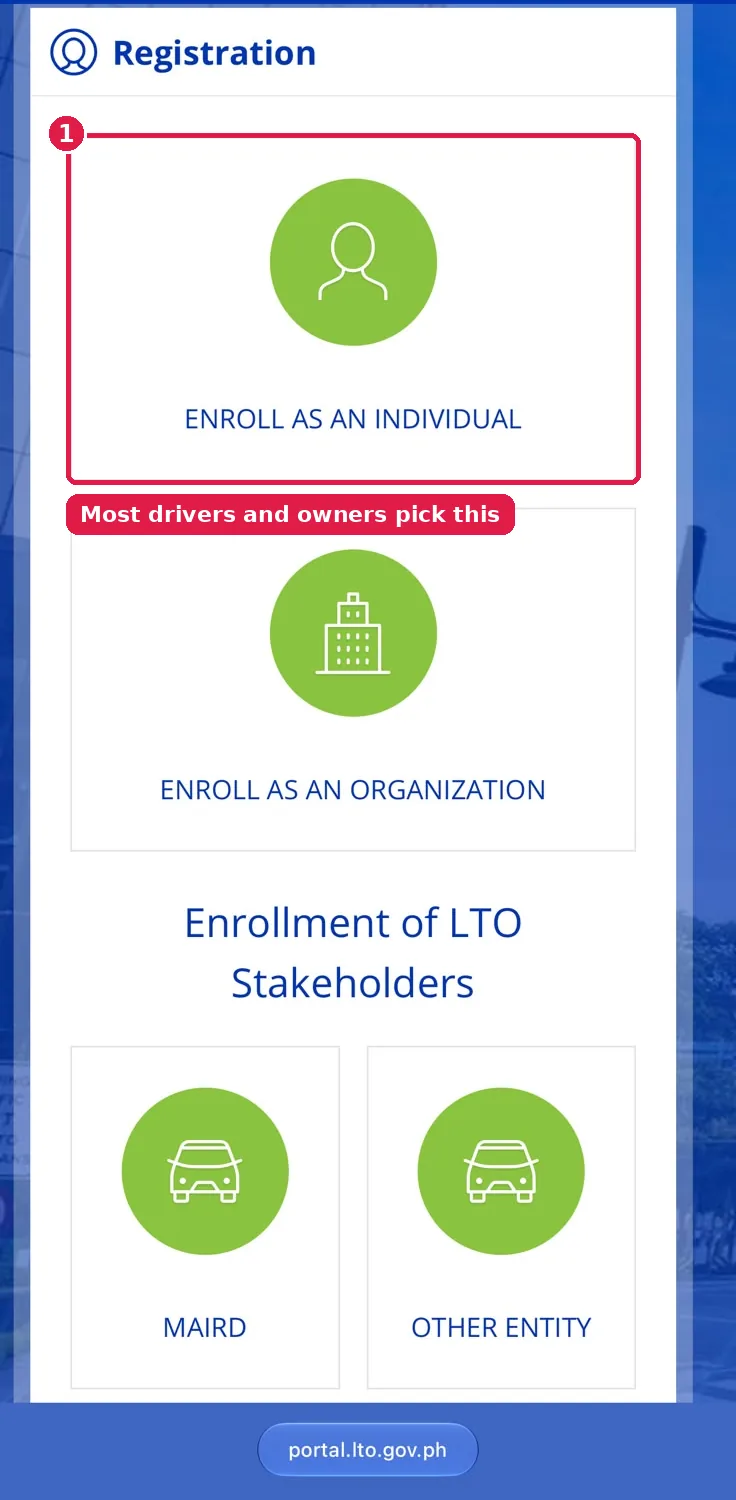
If you're on your phone with a personal license in your wallet, pick Enroll as an Individual. The steps below follow that path. The individual form doesn't ask for a TIN or a business registration ID. If you've seen those mentioned elsewhere, they're for the other enrollment types.
Step by step
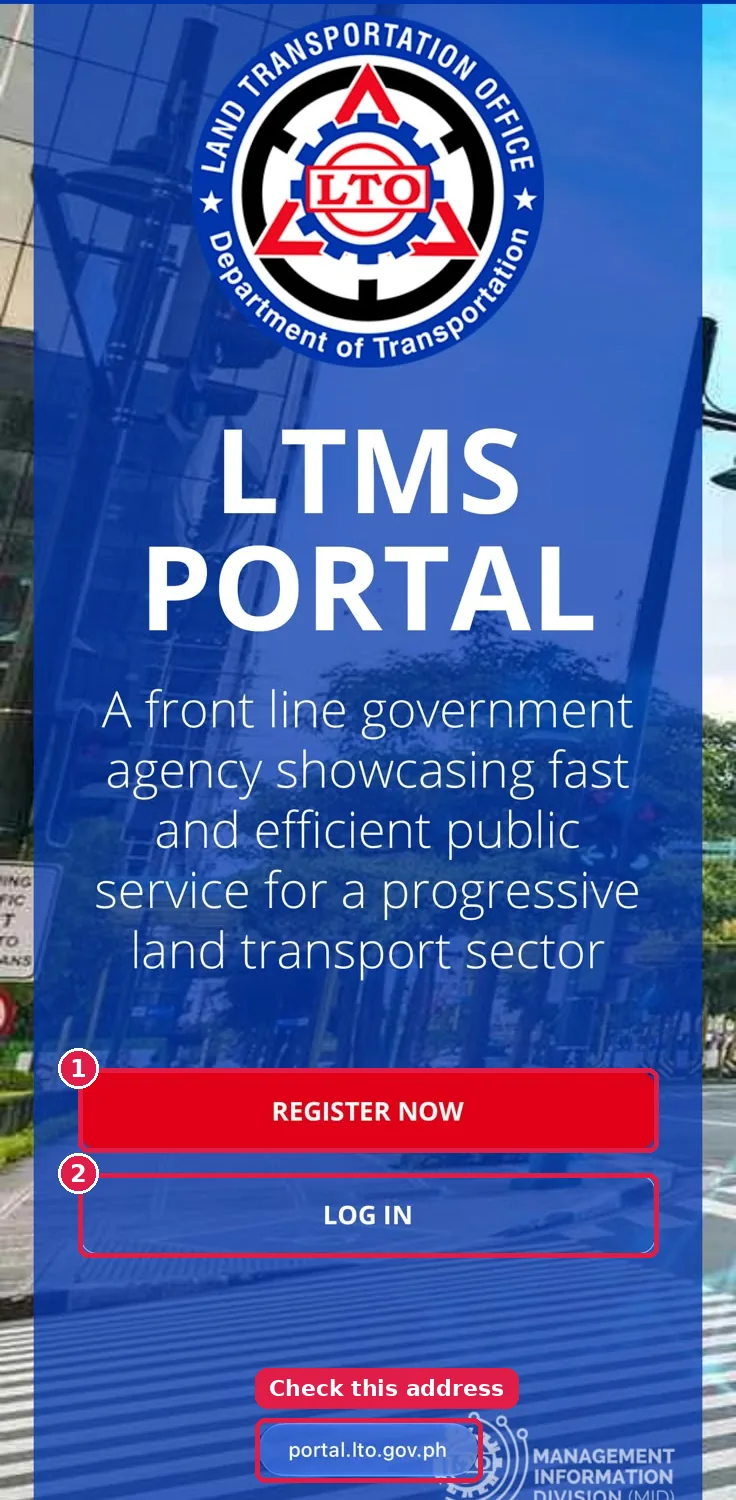
Open portal.lto.gov.ph and tap REGISTER NOW.
Type the address yourself instead of tapping a link from a text or an ad. You'll see a big red REGISTER NOW button with LOG IN below it.
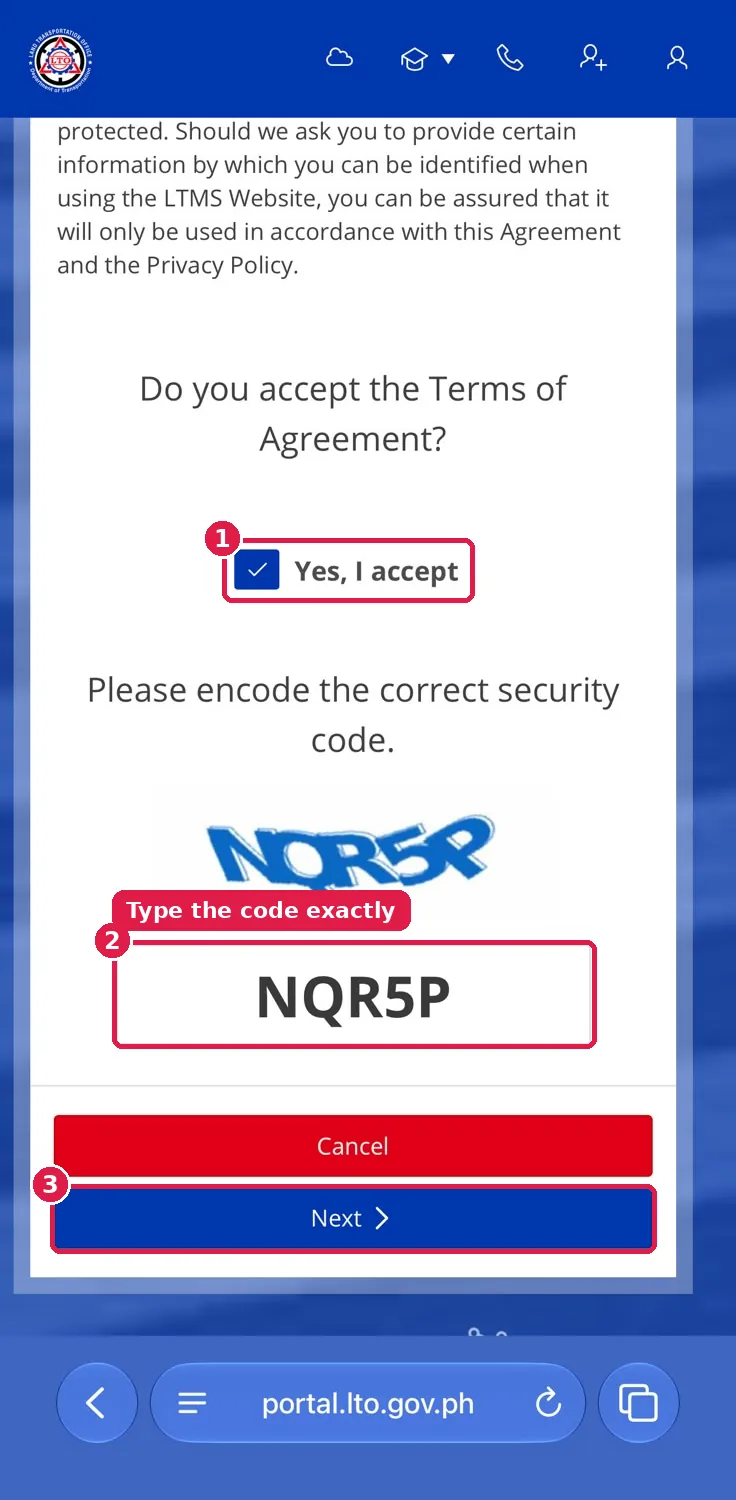
Accept the terms and type the security code.
Scroll to the bottom, tick Yes, I accept, and copy the code from the image into the box. Then tap Next.
The code is wobbly on purpose, so watch the look-alikes: O and 0, S and 5, I and 1. Can't read it? Reload the page for a fresh code rather than guessing three times.
Tap ENROLL AS AN INDIVIDUAL.
Answer the license question (step 1 of 4).
Four dots across the top show your progress. The question reads: Do you have a Philippine Driver's or Conductor's License? Above it is a reminder: "Failure to provide your existing license can delay your application." Believe it.
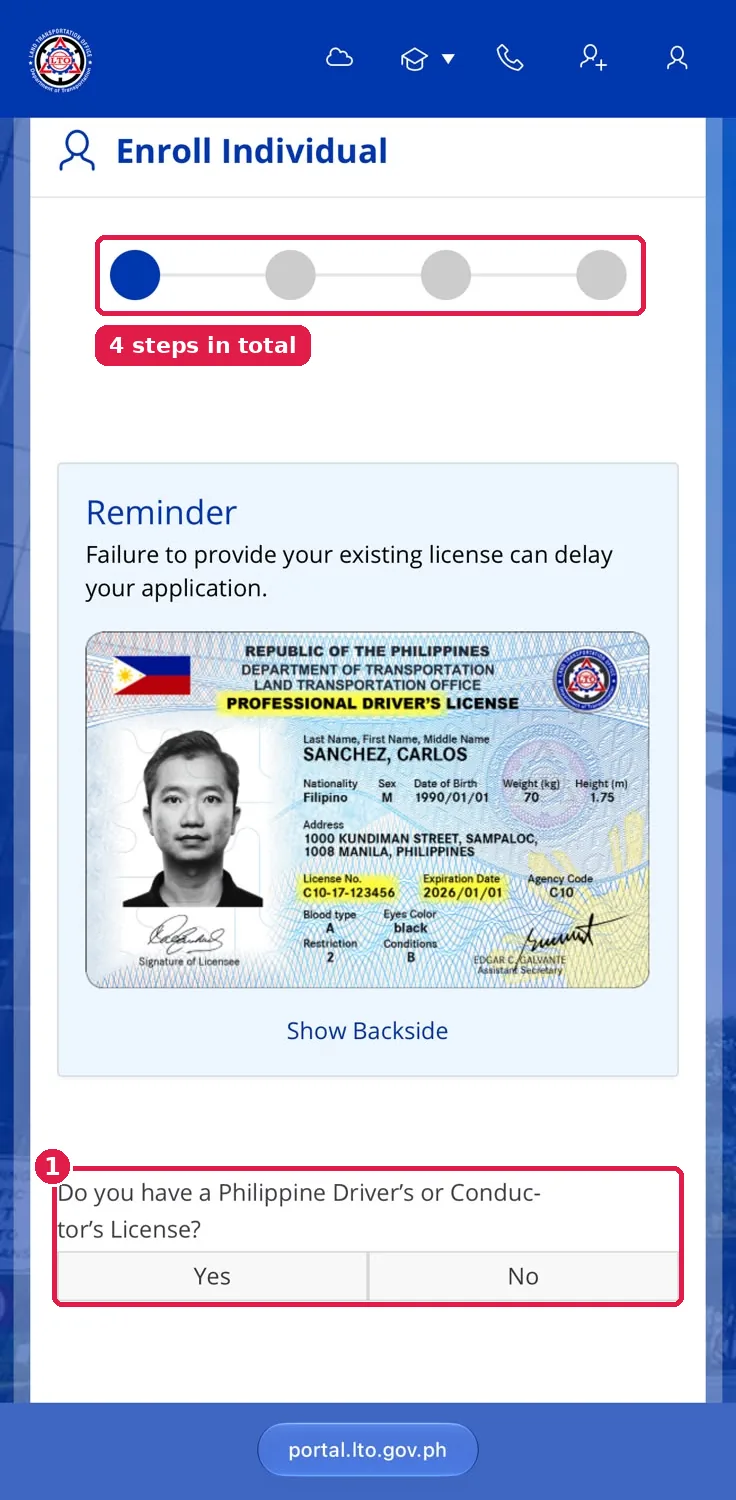
If you have a license, link it now
Tap Yes, then fill in the section that applies: Driver's License, Conductor's License, or both.
- License No.: exactly as printed, dashes included. The portal's own sample card uses the format C10-17-123456.
- Expiry Date: YYYY/MM/DD, year first.
- Serial No.: turn the card over. It's on the back.
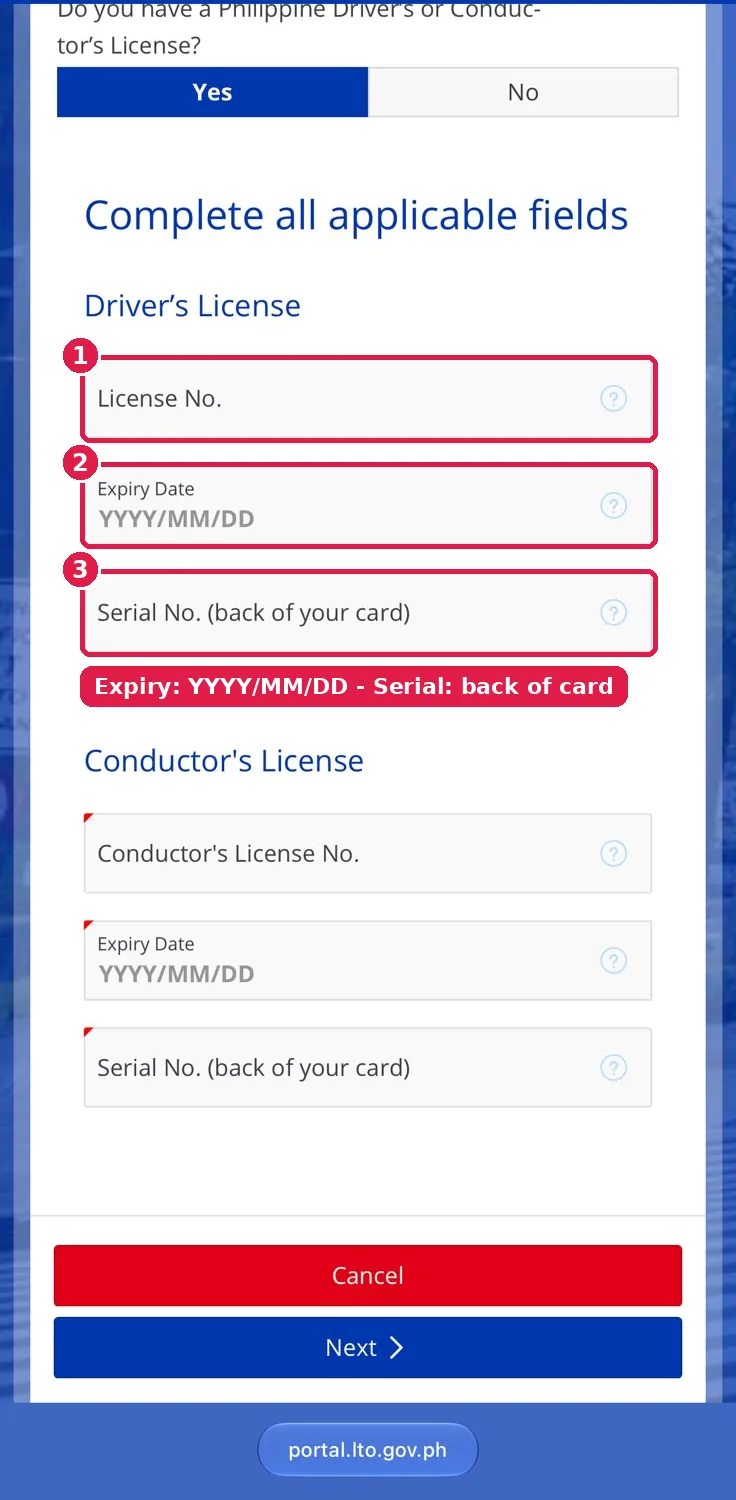
Why do it now and not "later"? A linked license is what fills your account with anything useful: your Digital ID, your license details and the violations recorded against it. Skip it, and LTO has to connect your license by hand later. That means an email to Client Care or a trip to the office.
No license yet? Tap No and keep going. That's the normal path for first-time student permit applicants.
Have a license but lost the card (so no serial number)? You can tap No and finish signing up, but expect to ask LTO to link your license afterwards. Better still, sort out the replacement card first.
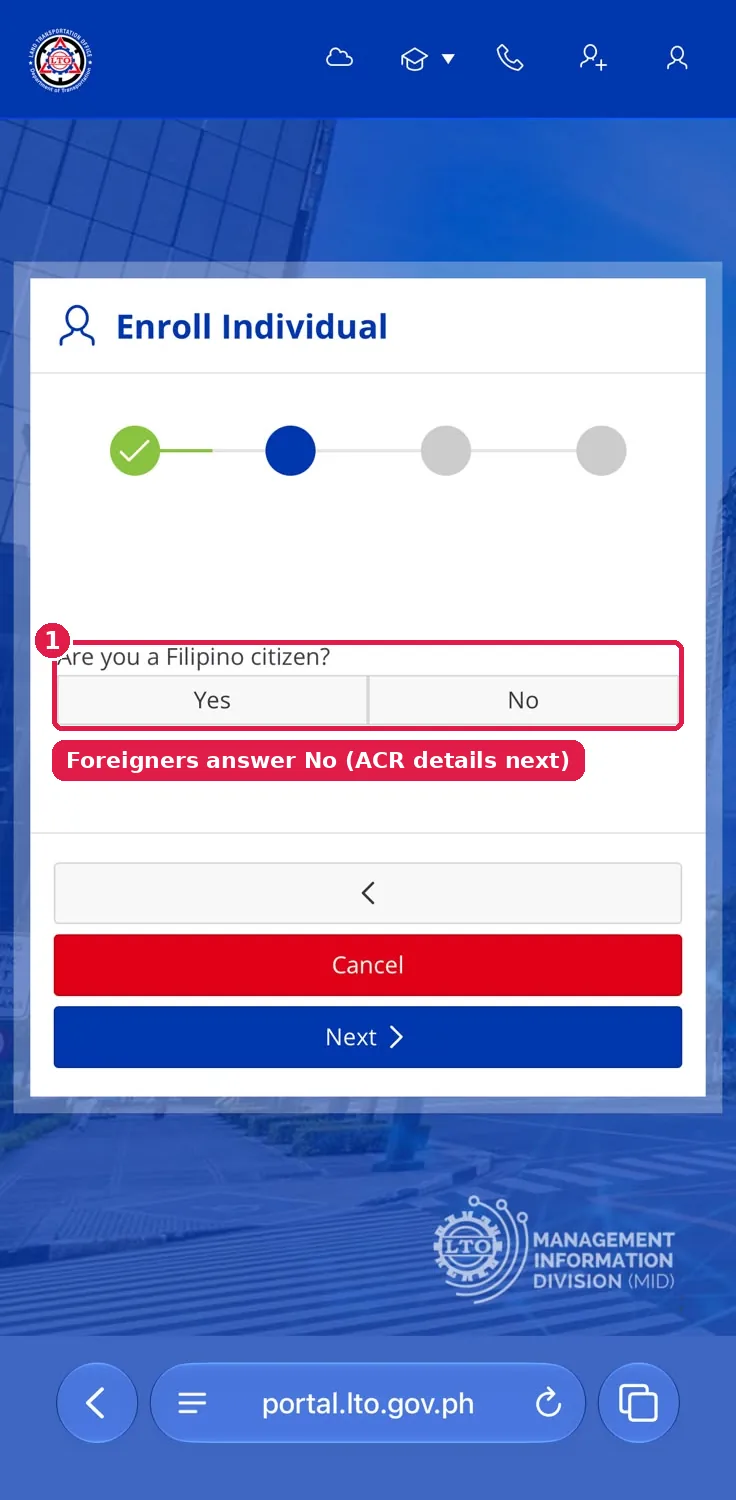
Answer the citizenship question (step 2 of 4).
Filipinos tap Yes. Foreign nationals tap No and fill in their ACR details next.
Fill in your personal details (step 3 of 4).
Last, first and middle name, then birth date, gender, and your mother's maiden name.
Slow down at the date. On the license screen, the expiry was YYYY/MM/DD. Here, your birth date is MM/DD/YYYY. Same form, two date orders. Born on 5 March 1994? Type 03/05/1994. Not 1994/03/05, and not 05/03/1994. If you'd rather not think about it, tap the calendar icon and pick the date.
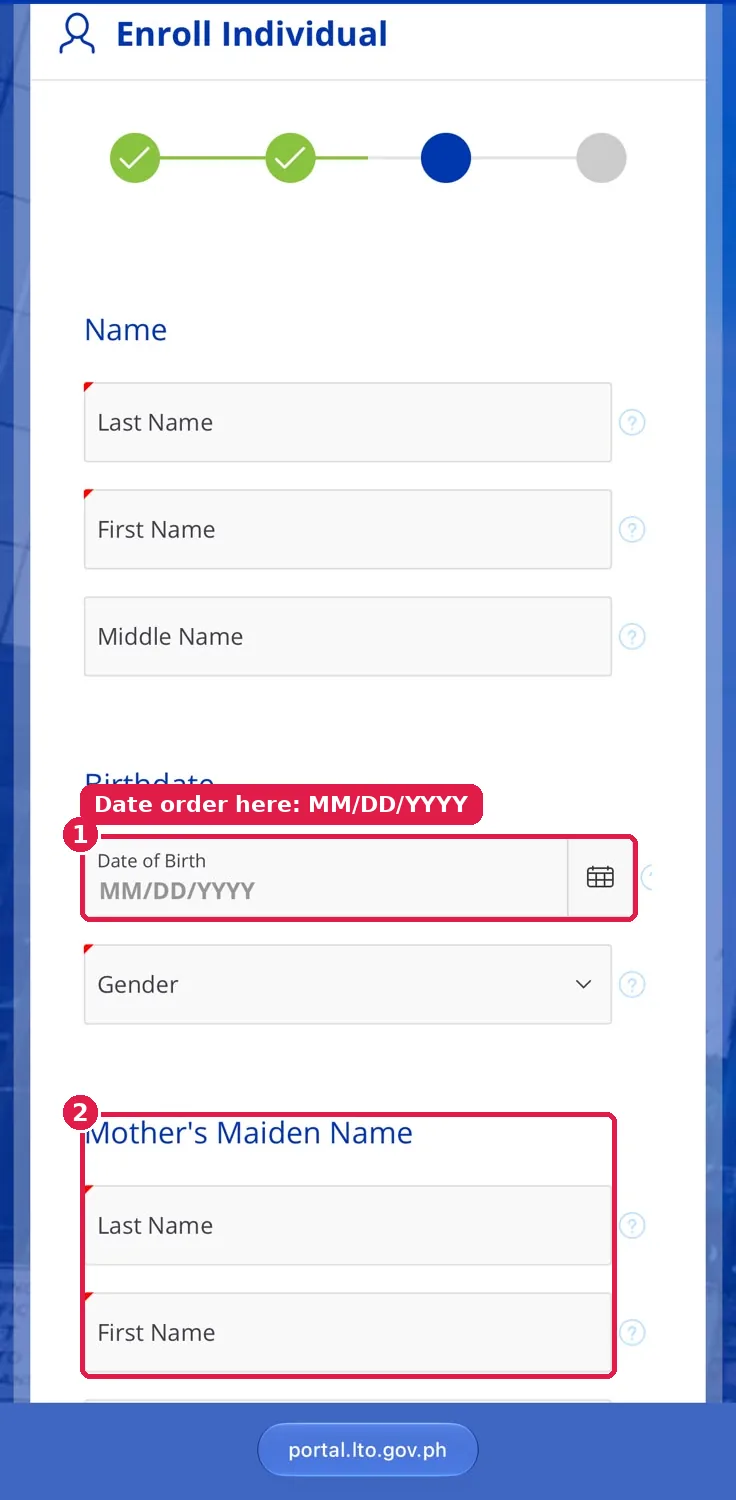
Match your name to your license or PSA birth certificate, letter for letter. "Ma. Cristina" on the card and "Maria Cristina" here is exactly the sort of mismatch that ends with you at the counter on a Monday morning explaining yourself.
Add your contact details (step 4 of 4) and tap Create Account.
Type your email twice. The area code is already set to PHL (+63), so your mobile starts with 9. That's 917-XXXXXXX, not 0917.
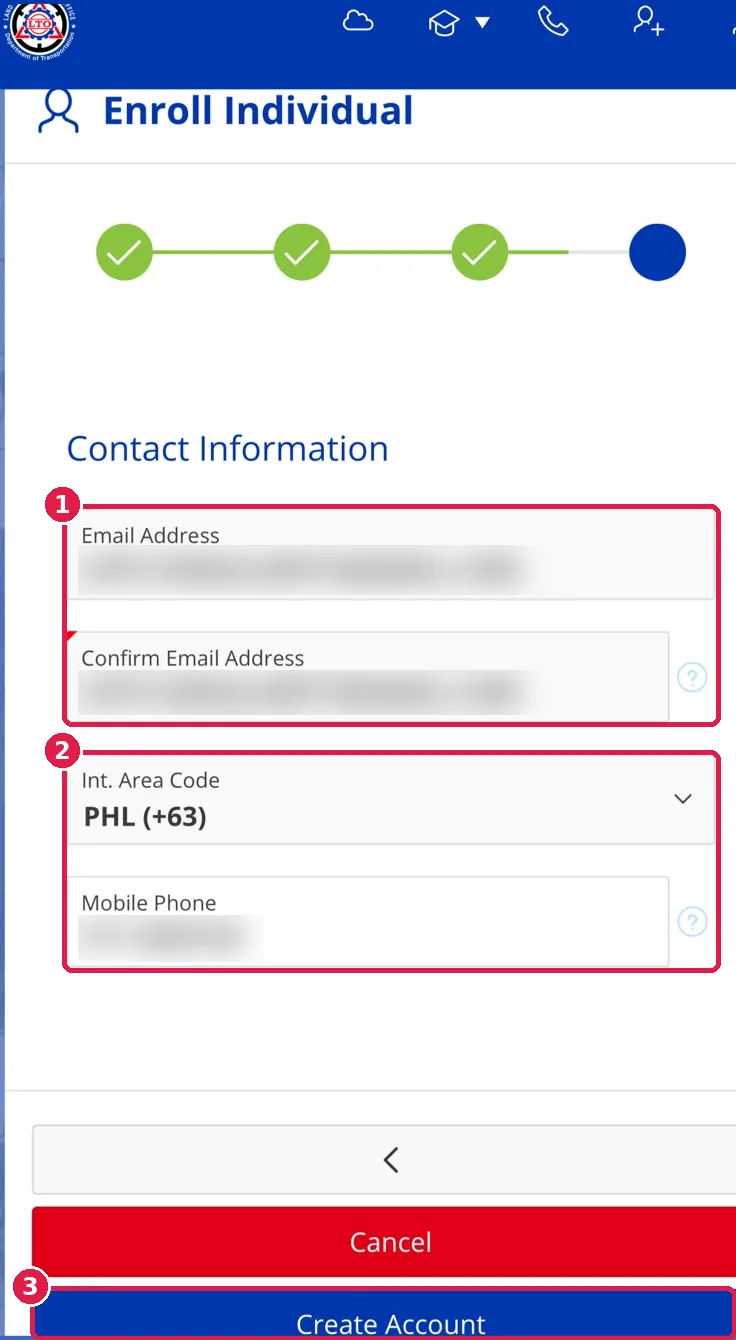
Before you tap Create Account, read your email address once more, slowly. One wrong letter and the verification link lands in a stranger's inbox, while your registration sits in limbo for a week.
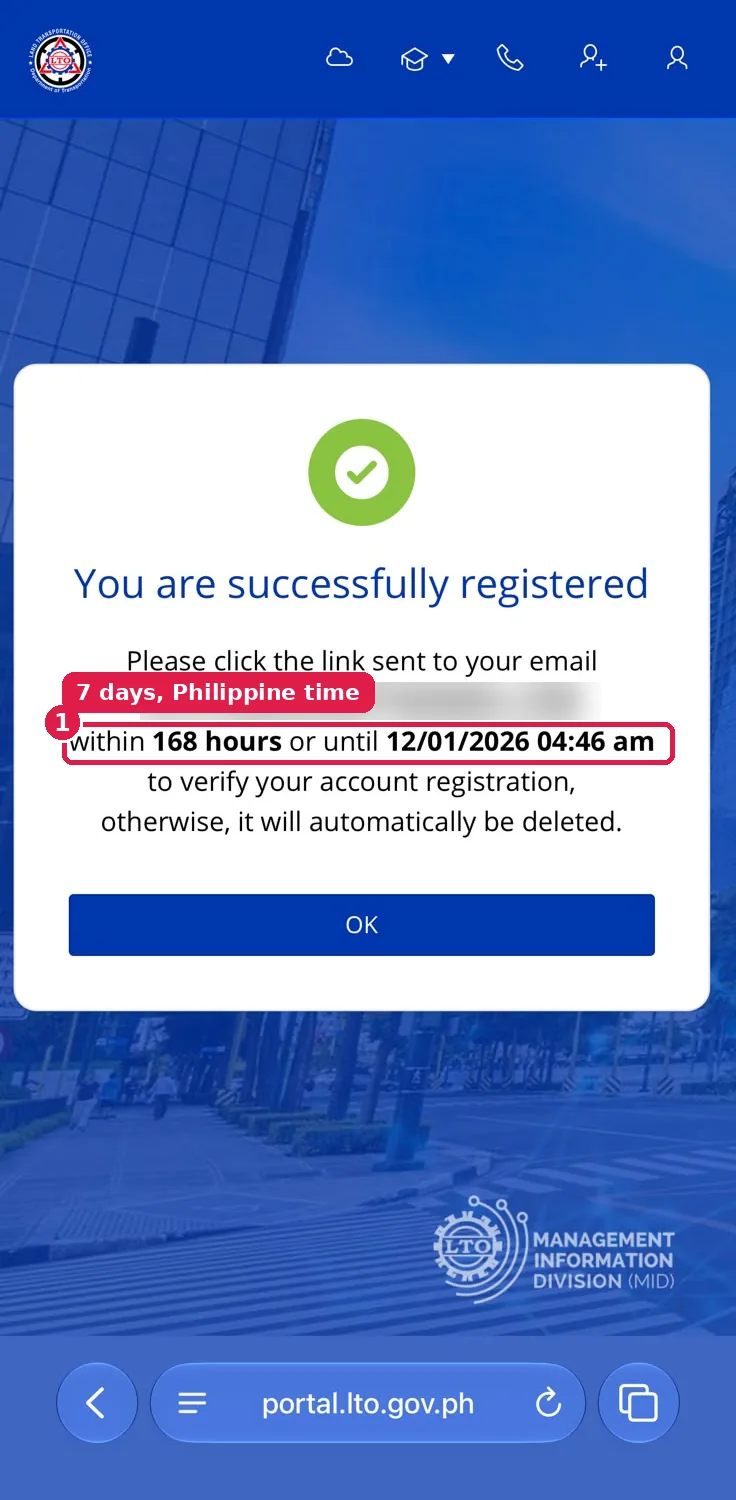
Note your deadline: 168 hours.
The screen says "You are successfully registered". It also gives you a deadline to click the emailed link: within 168 hours (7 days), with an exact date and time. Miss it, and the registration is deleted automatically.
That time is Philippine time. If you're an OFW in Dubai or Riyadh, adjust. Or skip the math and open the email today.
Open LTO's email and tap the link.
Look for "Thank you for registering on LTO Portal!". It shows your registration date and name, and a blue link. If tapping does nothing, the email also gives a long backup URL you can copy into Chrome or Safari. It repeats the expiry time and lists [email protected] for help.
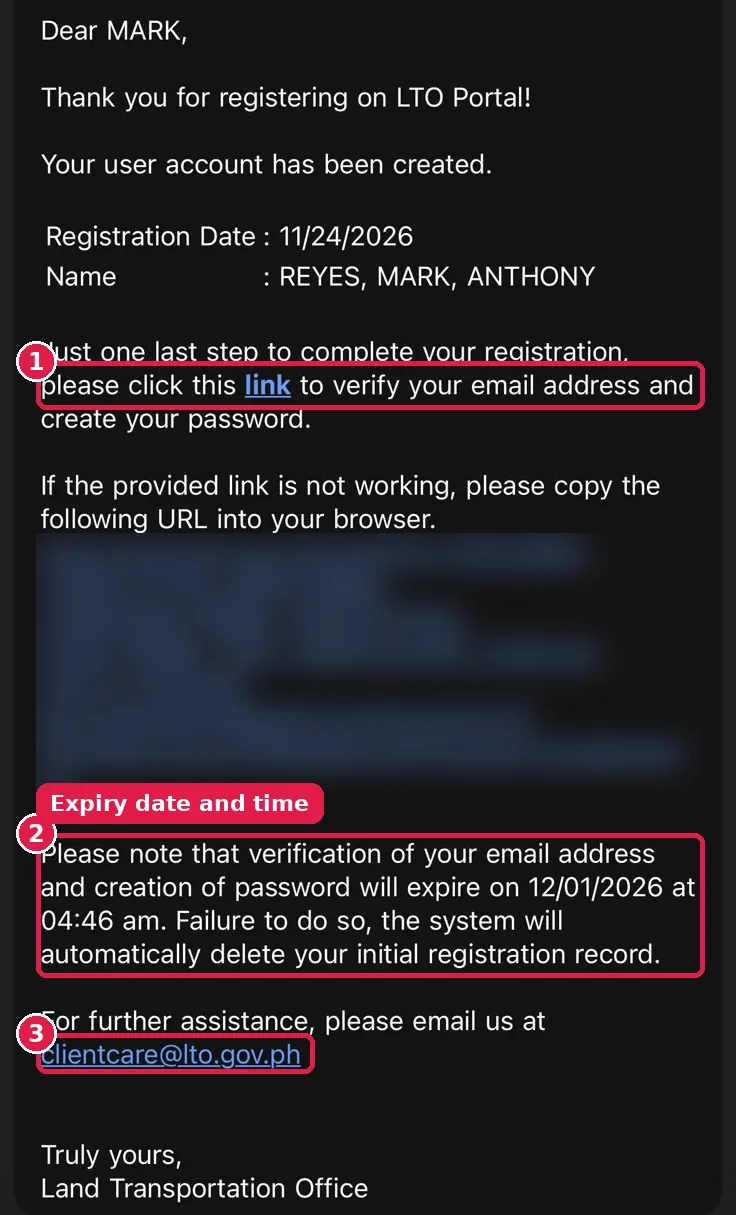
That long URL carries your personal verification code. If you post a screenshot in a Facebook group asking for help, blur it first.
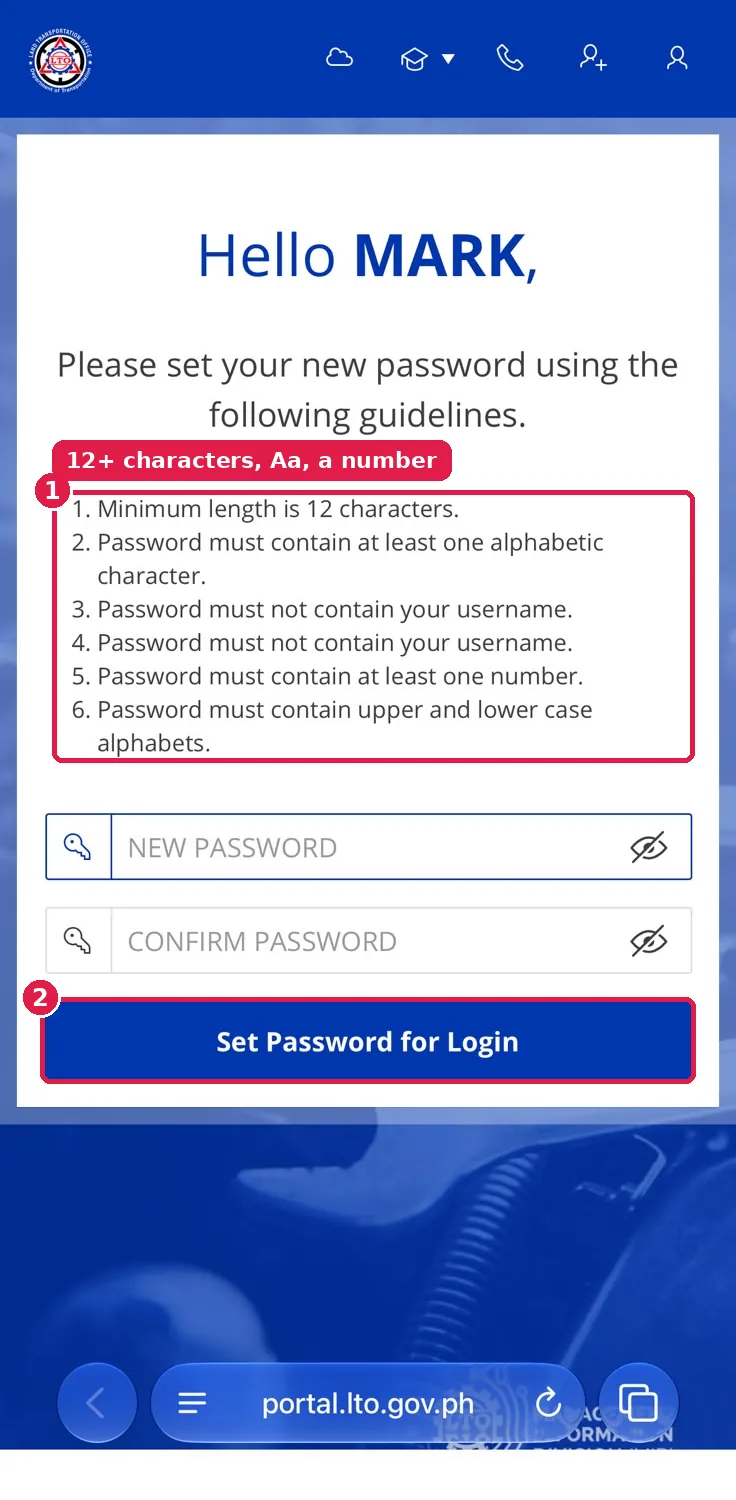
Set your password.
The portal's rules:
- at least 12 characters
- at least one letter
- at least one number
- both UPPER and lower case
- must not contain your username
Type it twice, then tap Set Password for Login.
Something like
KalyeMabini2026Pasigpasses. (Pick your own, obviously. This one is now public.) Older guides online say 8 characters. That's out of date, and the portal will reject it.Sign in for the first time.
A green banner says "Your account has been verified and confirmed". Now look at the username box: a number like 26-XXXXXX-XXXXXXX is already in it. That's your LTO Client ID. Enter your new password and tap Sign In.
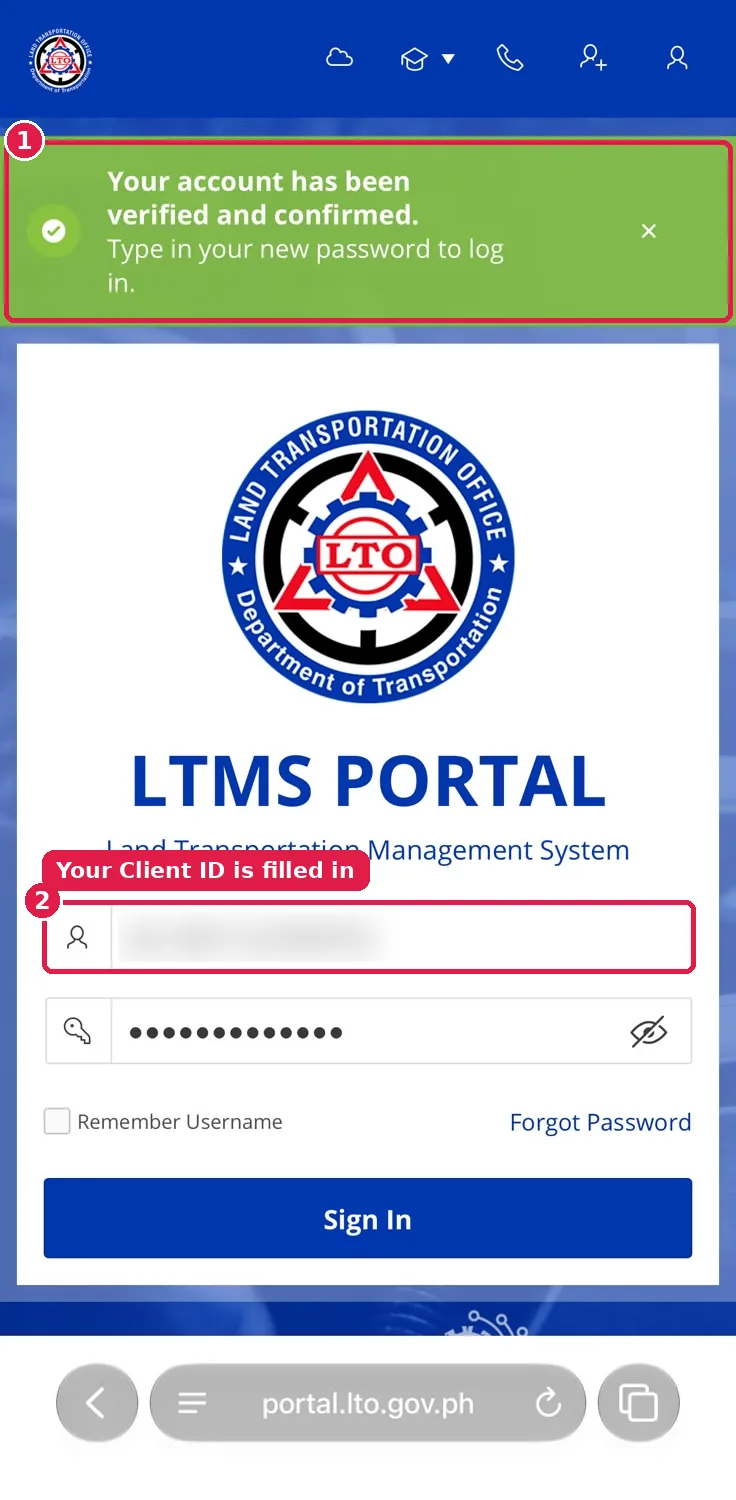
Screenshot that number or write it down now. You'll need it at an LTO counter someday, and you'll thank yourself.
No verification email? Six checks, in order
If the email doesn't come, check spam first, then email [email protected]. You have 168 hours before the registration is deleted.
- Give it 10 minutes. Government mail servers aren't always quick.
- Search your mail for "LTO". The subject begins "LTO - Public Portal".
- Check Spam, Promotions and Updates. Gmail loves hiding things there.
- Re-read the address you typed, on the success screen if it's still open.
- Still nothing after a few hours? Email [email protected] with your full name and the email you used.
- Past 168 hours? The registration is gone. Start again from step 1. This is the only time a fresh registration is the right move.
What not to do: open a second account with another email "just in case". Two accounts under one name is a tangle only LTO can untangle. If your old account exists and you've lost the password, recover your existing LTMS account instead.
How to log in to the LTO portal
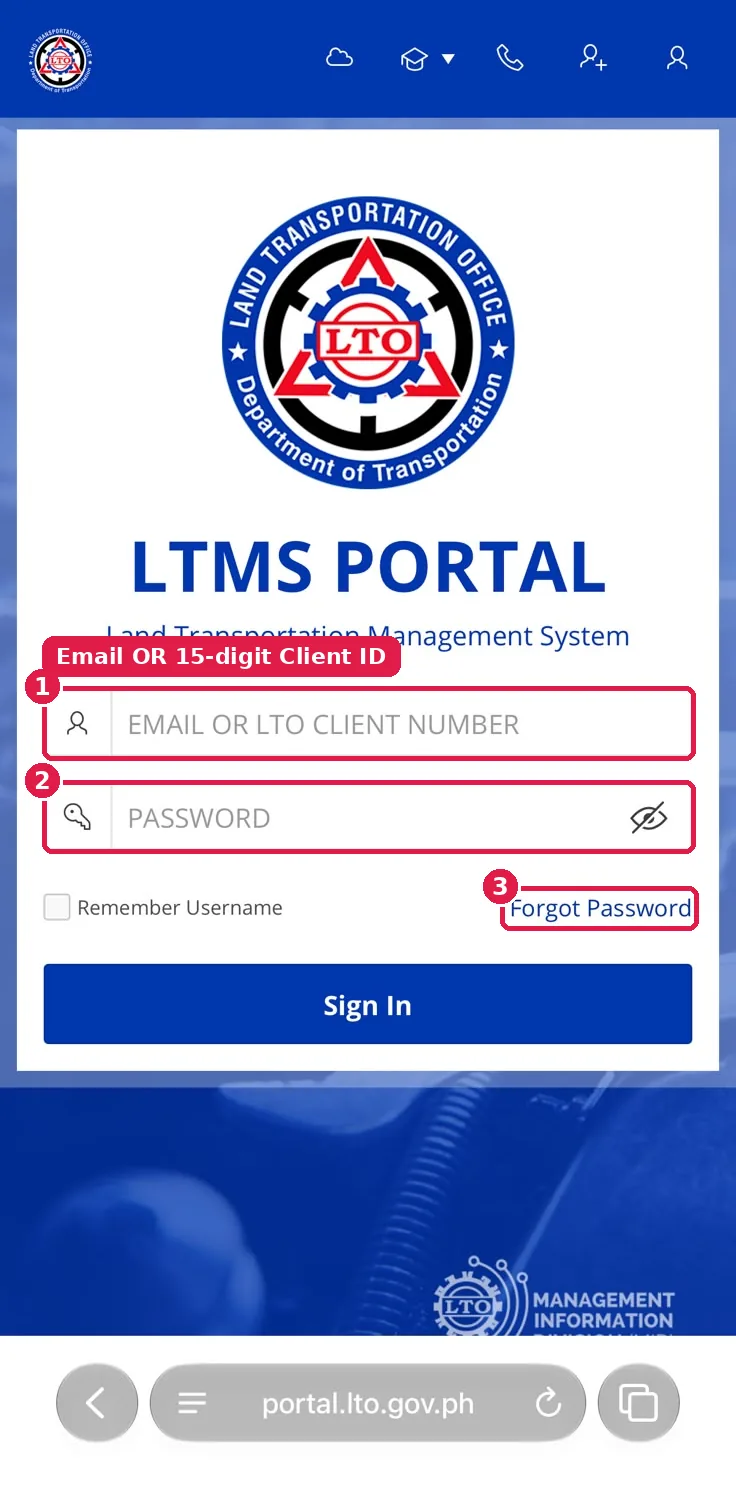
Go to portal.lto.gov.ph, tap LOG IN, and enter your email or your LTO Client Number with your password. Then tap Sign In.
The login box takes either one. Under it are a Remember Username tick-box and the Forgot Password link.
| Log in with | Best for | Watch out for |
|---|---|---|
| Everyday use, because it's easiest to remember | It must be the exact address you registered with | |
| LTO Client ID | When you've changed emails, or email login keeps failing | Type it with the dashes, as shown in Profile |
| License number | Not accepted on the login screen | Use your email or Client ID |
Our take: log in with your email day to day, and keep the Client ID as your backup. Tick Remember Username only on your own phone. At a piso-net or a shared office PC, leave it off.
Login not working? Quick checks:
- Password says wrong, but you're sure? Check caps lock, then use Forgot Password. Our LTMS password reset guide covers resets that never arrive, and lost access to the old email.
- Page blank or won't load? Probably the system. Wait and try again later, ideally outside office hours.
- "Already registered" but you can't get in? You probably made an account years ago. Recover that one. Don't make another.
Your LTO Client ID: what it is and where to find it
Your LTO Client ID is your permanent 15-digit number in LTO's system, in the format 00-000000-0000000. You'll find it at the top of your Profile.
It's also called the LTO Client Number. Every license, permit, vehicle and violation on your record hangs off it. You get it the moment you register, and it shows up in three places:
- Pre-filled in the login box right after you verify your email
- In your Profile, as the first field under Name, labelled "LTO Client ID"
- Inside the verification link in LTO's email. Profile is easier to read, though
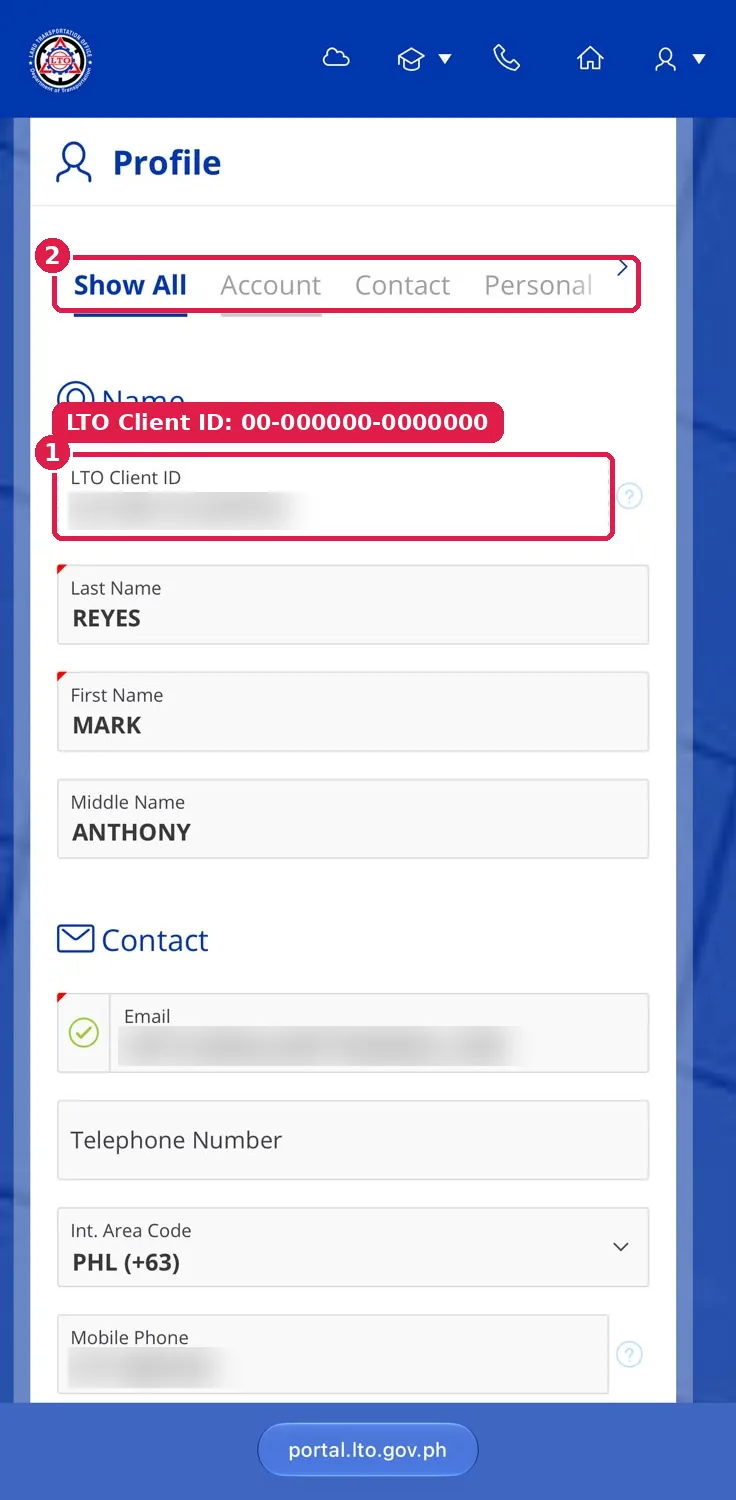
You'll use it at LTO counters, on forms, in any email to Client Care, and as a second way to log in. For LTO's own explanation, open the LTO Client ID Tutorial under the graduation-cap menu.
Finish your profile while you're here
It's tempting to close the tab once you're in. Give it two more minutes.
Open PROFILE, go through the tabs (Show All, Account, Contact, Personal, and more if you swipe sideways), fill in anything blank, and save. License and registration applications pull details from here, so gaps become questions from the evaluator. It's also where you update your mobile number after switching SIMs, which in a country of promo-hoppers happens a lot.
The LTMS dashboard, tile by tile
After you log in, the dashboard shows seven tiles: Digital ID, Licensing, Vehicle, Transactions, Violations, Documents and Profile. Each one opens a different set of services.
The portal greets you by first name and asks, "What would you like to do?"
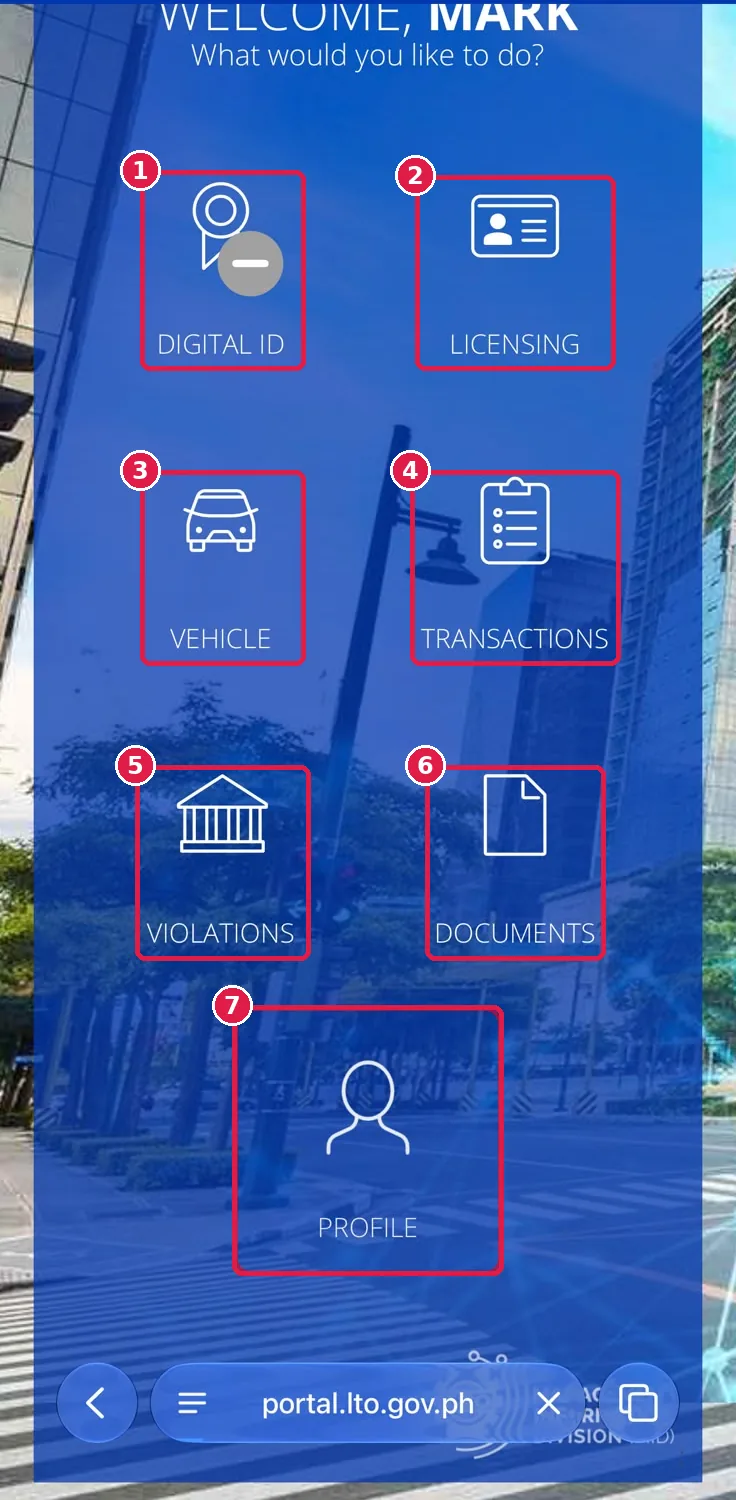
| # | Tile | What it's for | Read next |
|---|---|---|---|
| 1 | Digital ID | Your digital driver's license, once a license or permit is on record | Digital ID message |
| 2 | Licensing | License transactions: student permit, renewal and others | Renew your driver's license online · Student permit |
| 3 | Vehicle | Applications for vehicles linked to your Client ID | Vehicle registration renewal |
| 4 | Transactions | Status of what you've applied for | Next section |
| 5 | Violations | Demerit points, unsettled violations, history | Checking violations |
| 6 | Documents | Documents tied to your transactions. Expect little here on a new account | |
| 7 | Profile | Client ID, personal and contact details | Client ID |
The graduation-cap menu is the portal's classroom. It holds the CDE Online Validation Exam, the Driver's License Renewal Course, the LTO Client ID Tutorial and the Driver's Manual, plus reading on everything from Getting Ready to Drive to Fines and Penalties for Violations.
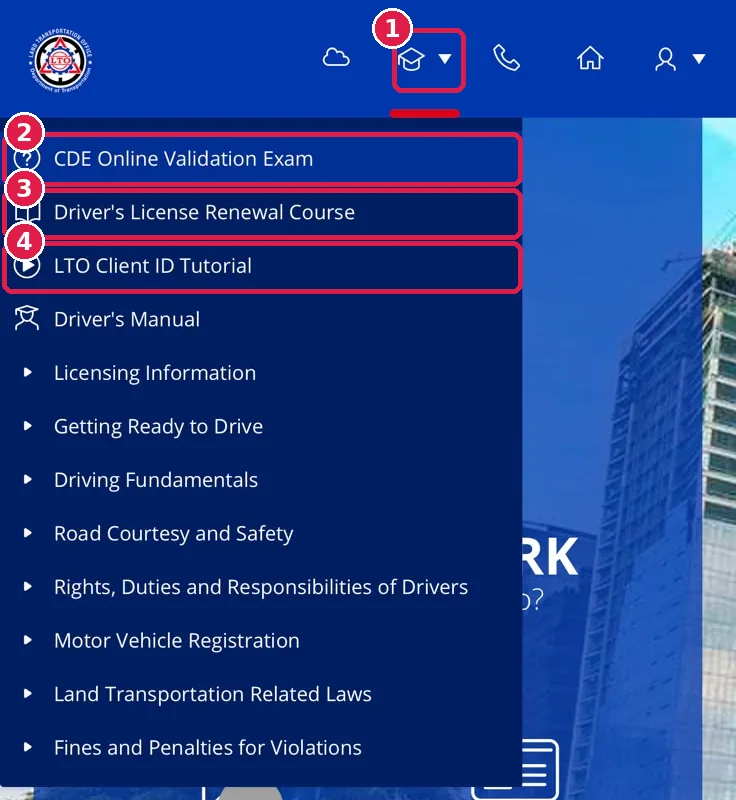
Renewing soon? The exam is usually where you start. Here's how to take the LTO portal exam (CDE).
"Digital ID can not be generated"
This message means no license or permit is linked to your account. Tap Digital ID on an account without a license and the portal politely says no. It tells you that you don't have a license yet and should apply for a Student's Permit.
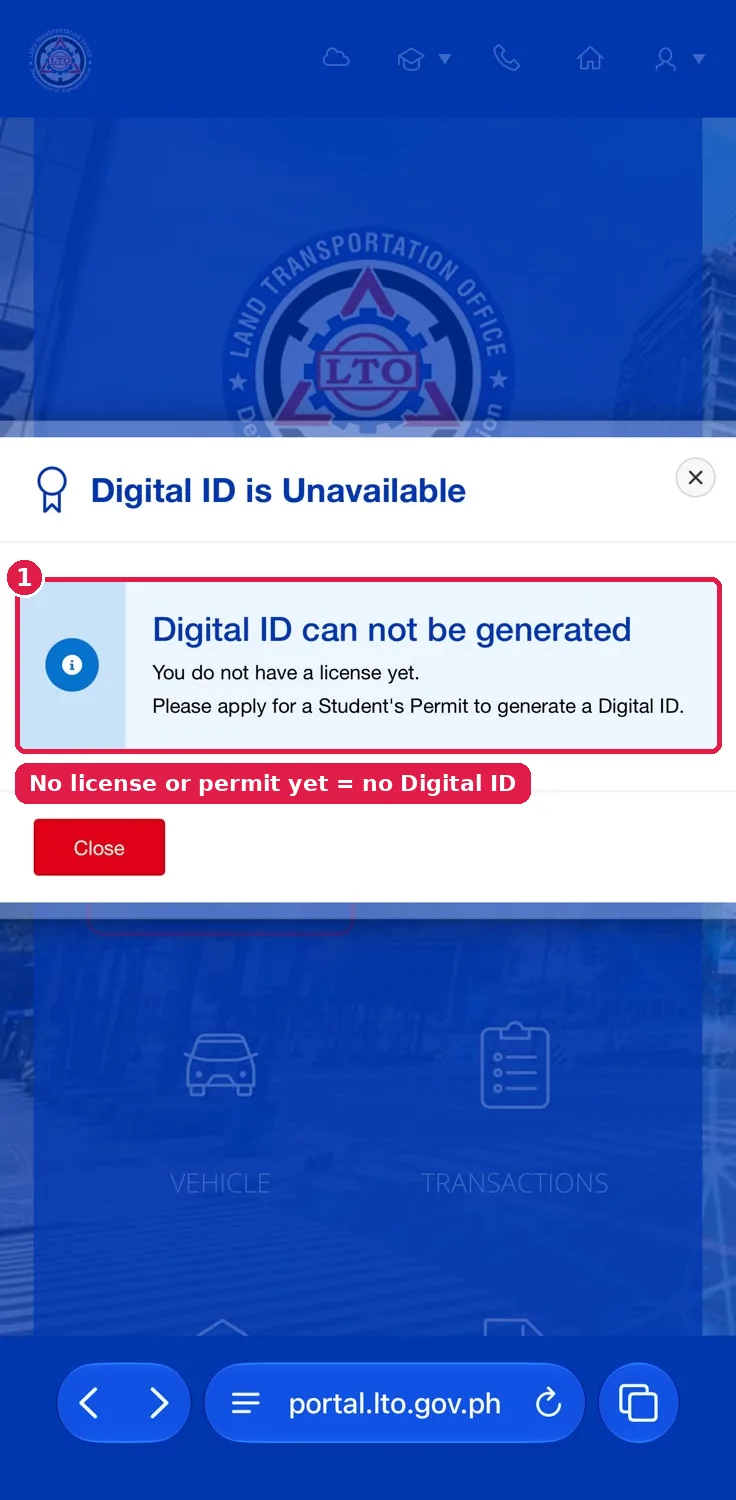
If you truly have no license, that's expected. If you do have one, your license isn't linked. Usually it's because someone tapped "No" at the license question. Email [email protected] with your Client ID and license number, or bring the card to an LTO office and ask them to link it.
Adding your car or motorcycle
On the LTMS portal, you don't add a vehicle yourself. The Vehicle tile only lists vehicles LTO has already linked to your Client ID. If yours is missing, the fix is a records issue, usually handled at the LTO office where the vehicle is registered.
That surprises a lot of people, because it's the opposite of what most guides imply.
Tap Vehicle and the portal shows the LTMS Terms of Use first. Read the fee paragraph (more on that below) and tap Accept. The next screen is Create Application, asking you to "Please select your Motor Vehicle" from a drop-down. When we set up a brand-new account, that drop-down was empty. There was no button to type in a plate number and claim a car.
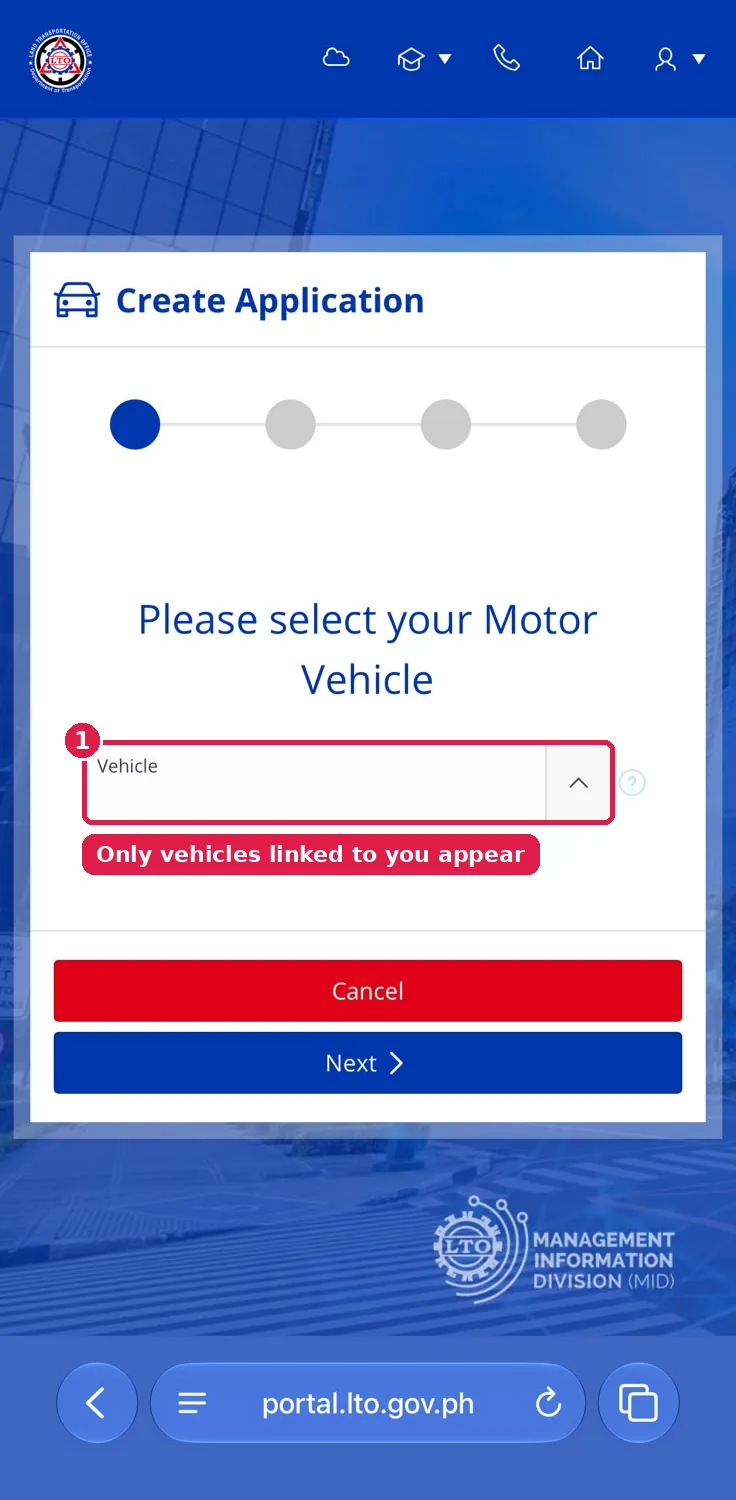
So if your car or motorcycle isn't listed, work through these:
- Whose name is on the CR? A vehicle links to its registered owner. If the CR still says the dealer, your Tito, or the guy you bought it from on Marketplace, it won't appear on your account. That's the system working correctly.
- Brand-new vehicle? The dealer handles the first registration. The record has to be complete before it links to you, so give it time.
- Bought second-hand? It stays under the seller until the transfer of ownership is done at LTO.
- Registered to you and still missing? Bring your OR/CR and a valid ID to the LTO district office where the vehicle is registered and ask them to link it to your Client ID. That's not necessarily the Central Office on East Avenue. Emailing [email protected] first, with your Client ID and plate or MV file number, can save you a wasted trip.
Still on a temporary plate? Your vehicle is identified by its MV file number until the permanent plate arrives. To find out if it's ready, use our LTO plate tracker guide.
Once your vehicle does appear, this is where renewals start. Follow our vehicle registration renewal walkthrough.
Checking violations and demerit points
To check LTO violations, log in to portal.lto.gov.ph and tap VIOLATIONS. The window shows three tabs: Demerit Points, Unsettled and History.
First, the text message, since that's why many people end up here. LTO does not send violation notices by SMS with a link to pay. The agency has said so publicly, more than once. Those links lead to fake portals built to take your card or e-wallet details. In November 2025, LTO-NCR named one of them: ltms-portalph.com. Look how close that is to the real thing.
Got one of those texts? Don't tap. Open your browser, type portal.lto.gov.ph yourself, log in, and look. The truth is on your own dashboard.
How to check
- Log in at portal.lto.gov.ph.
- Tap VIOLATIONS.
- Switch between the tabs: - Demerit Points: your running total. Zero is the dream. - Unsettled: violations still open. - History: everything recorded on your license, settled or not.
- Tap Close when you're done.
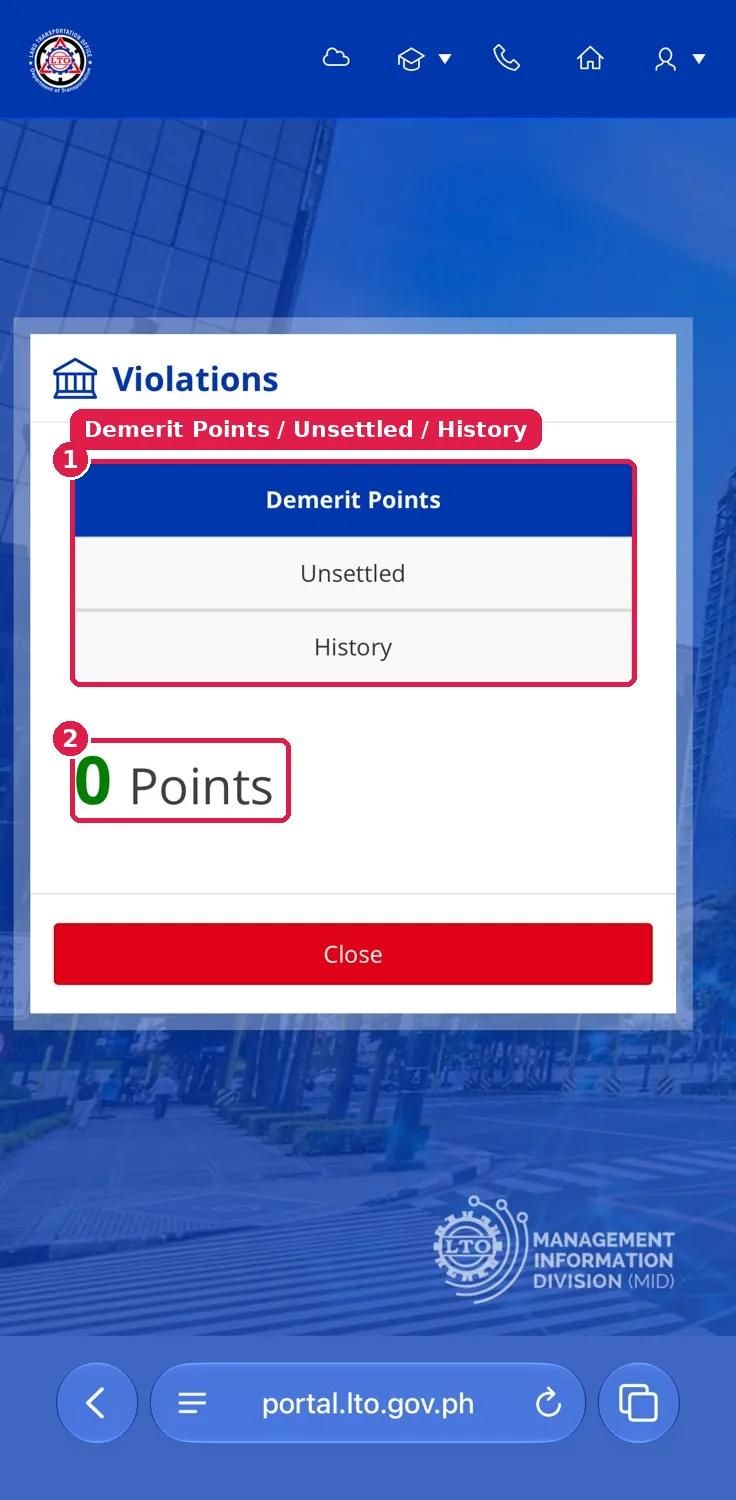
Demerit points come from the system set up under Republic Act 10930. Collect too many and it catches up with you at renewal time.
Something under Unsettled? Settle it through whatever the portal offers for that violation, or at an LTO office, and keep the official receipt. Think it's wrong? Contest it with the office that recorded it instead of paying just to make it disappear. If you're not sure which office that is, LTO Client Care ([email protected]) can point you to it.
Worried about an alarm on your vehicle? The Violations window covers violations on your license, not holds on a vehicle. If you suspect an alarm, ask the LTO office that handles the vehicle's registration before your renewal date, not on it.
What you can and can't finish online
You can do your account, violations, Digital ID and the CDE exam fully online. License and registration renewals start online but still need an office visit. Linking missing records, corrections and ownership transfers are office-only.
The portal saves real time, but it won't replace every trip to LTO. Knowing which is which saves you a wasted morning in line.

| Task | Online? | Still in person | Guide |
|---|---|---|---|
| Create account, get Client ID | Fully | Nothing | Register |
| Check violations and demerit points | Fully | Contesting a violation | Violations |
| View Digital ID | Fully, once a license or permit is on record | Linking a license that didn't link at sign-up | Digital ID |
| CDE exam and renewal course | Fully | Nothing | LTO portal exam |
| Student permit | Starts online | Requirements and biometrics at LTO | Student permit |
| Driver's license renewal | Starts online | Depends on your case: medical, photo, card release | License renewal |
| Vehicle registration renewal | Starts online | Inspection, plus plate or sticker | Registration renewal |
| Link a missing vehicle | No | LTO office, with OR/CR | Vehicle checks |
| Record corrections, transfer of ownership | No | LTO office |
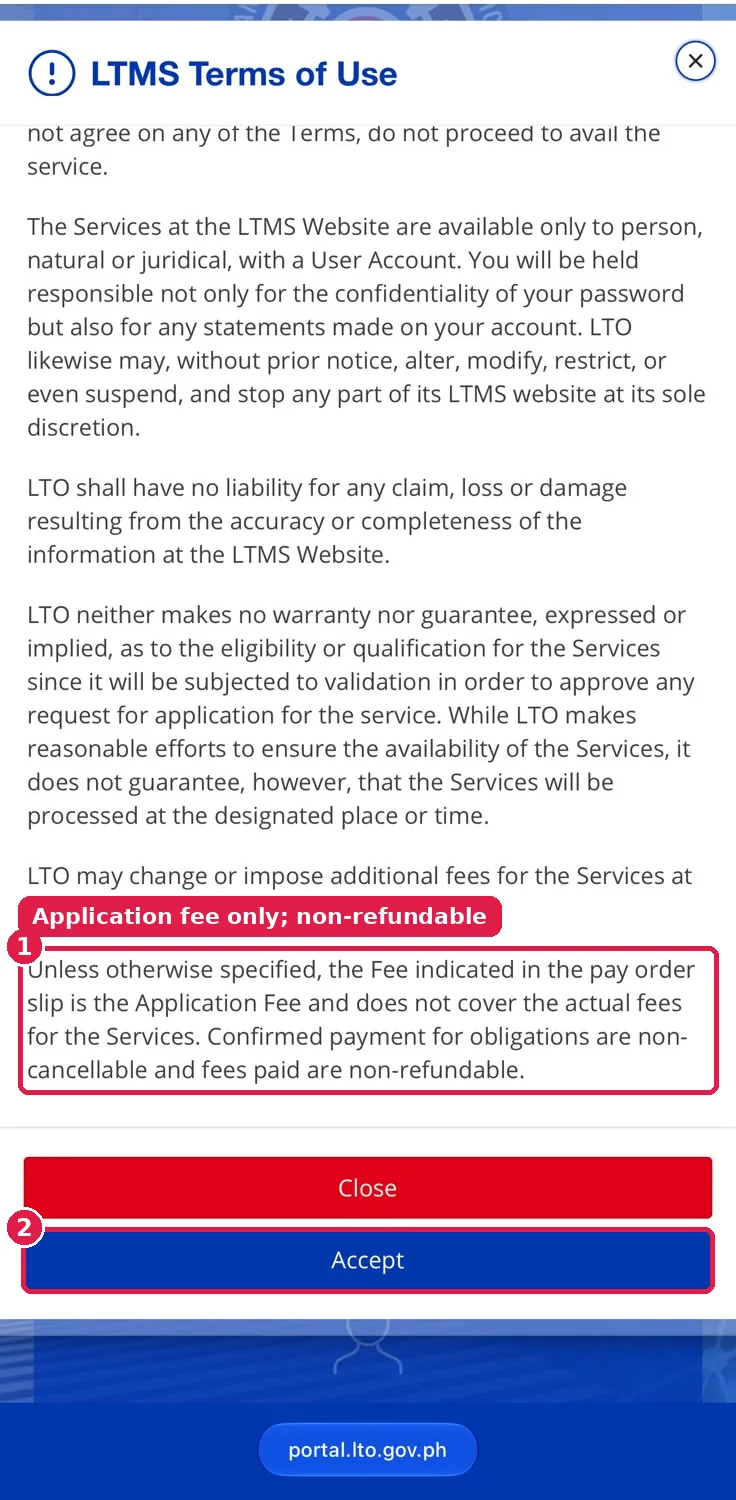
One thing to read before you pay for anything. The LTMS Terms of Use say that, unless stated otherwise, the fee on a pay order slip is the application fee, not the full fee for the service. Confirmed payments can't be cancelled or refunded, and LTO may change fees without notice. So check that you picked the right transaction before you hit pay. Paying for the wrong one is money you won't see again.
Real LTO portal or fake? A 4-point check
The only real LTMS portal is portal.lto.gov.ph. Any other address calling itself the LTMS portal, or any link that reached you through a text, should be treated as fake.
Fake portals copy the seal, the blue and even the "LTMS PORTAL" title. The address is the one thing they can't fake.

| Signal | Real portal | Fake site |
|---|---|---|
| Address | portal.lto.gov.ph | Anything else: .com, extra words, odd spelling |
| How you got there | You typed it, or tapped Google's official result | A text, Viber message or social media post |
| Tone | Calm. Your records just sit there | "Pay within 24 hours or lose your license" |
| First thing it asks for | Email or Client ID, and password | Card number, e-wallet login, OTP |
| Violation notices | Inside your account | Sent to your phone with a link |
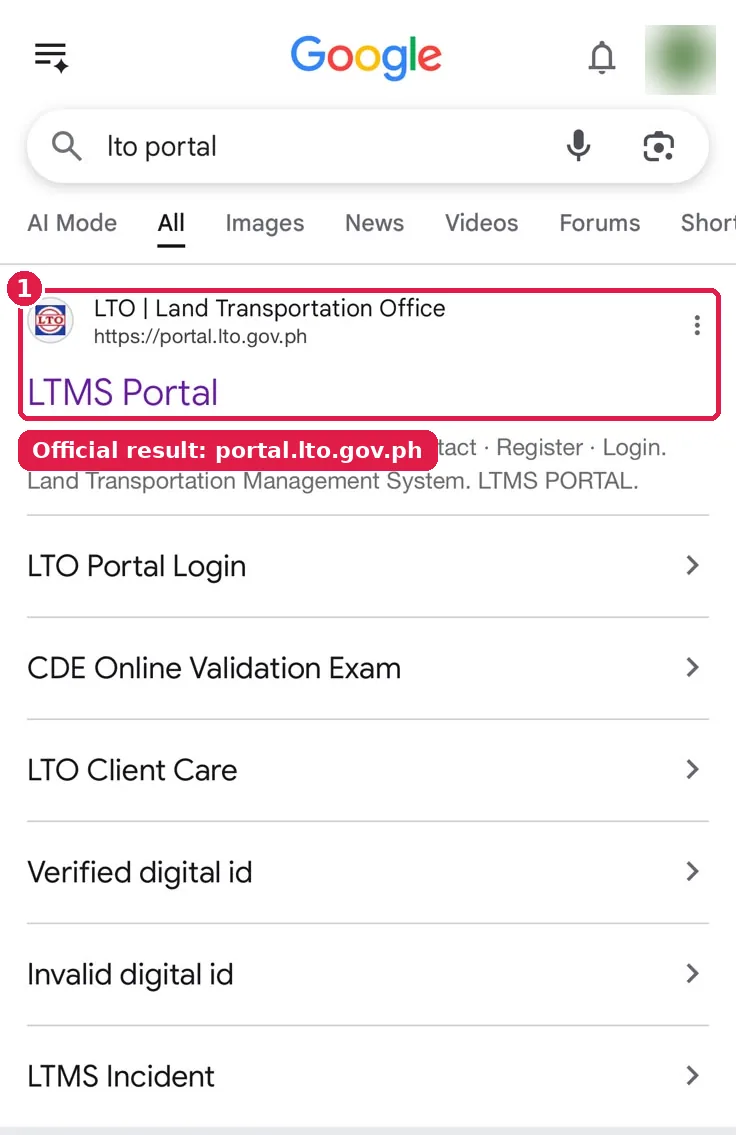
On Google, the genuine result reads LTO | Land Transportation Office, with https://portal.lto.gov.ph and the title LTMS Portal. It often has sub-links like LTO Portal Login, CDE Online Validation Exam and LTO Client Care. Ads can sit above it, so read the address, not just the bold title.
Already typed details into a fake site? Change your LTMS password now. Call your bank or e-wallet to block the card or account. Then report the link to LTO through Client Care or its official Facebook page.
LTMS Error Fixer
Pick where you're stuck and what's happening, and the fixer gives you the likely cause, the fix, and whether you need an LTO office.
It runs in your browser and sends nothing anywhere. The same answers are in the table below, in case the tool doesn't load.
Find your fix
Runs in your browser. Nothing you pick is sent anywhere.
| Stage | Problem | Likely cause | What to do |
|---|---|---|---|
| Registering | Security code rejected | Look-alike characters (O/0, S/5, I/1) | Reload for a new code; type slowly |
| Registering | License details rejected | Wrong date order, or dashes missing | License No. with dashes as on the card; expiry YYYY/MM/DD; serial from the back |
| Registering | Birth date won't accept | Typed year-first | Use MM/DD/YYYY, or the calendar picker |
| Registering | "Email already registered" | You have an older account | Don't make a new one. Recover it |
| Verification | No email | Spam folder, typo or delay | Run the six checks, then email [email protected] |
| Verification | Link opens blank | It opened inside an app | Copy the backup URL into Chrome or Safari |
| Verification | Link expired | Over 168 hours | Registration deleted. Register again |
| Logging in | Password rejected | Caps lock, or forgotten | Tap Forgot Password. Reset guide |
| Logging in | Don't know Client ID | Never noted it | Log in with email; it's first in Profile |
| Logging in | Portal won't load | System outage | Wait and try again later, outside office hours |
| Vehicle | Drop-down empty | Vehicle not linked to your Client ID | Vehicle checks; bring OR/CR to LTO |
| Violations | Text says you have a violation | Phishing | Don't tap. Log in yourself and check Unsettled |
| Violations | A violation you don't recognise | Possible error | Contest with the issuing office. Client Care can point you to it |
| Digital ID | "Digital ID can not be generated" | No license on your account | No license: apply for a student permit. Have one: ask LTO to link it |
Questions people ask about the LTMS portal
What is the LTO portal? Ano ang LTMS?
It's LTO's official online system at portal.lto.gov.ph. LTMS means Land Transportation Management System. One account holds your Client ID, digital license, violations and online applications.
When did LTMS start?
LTO signed the LTMS contract in 2018 and rolled the system out in stages. Since 10 September 2026, every LTO office processes transactions on LTMS only.
Is it free to register?
Yes. Creating an account costs nothing, and the sign-up never asks for payment. Anyone charging to "register you on LTMS" is charging for ten minutes you can spend yourself.
Is there an LTMS app?
Not an official one. Use the website in your phone's browser. Your digital license can also show in the eGovPH app.
Can I register without a driver's license?
Yes. Tap No at the license question. You'll still get a Client ID, and you need the account to apply for a student permit.
I didn't get the verification email. What now?
Search your inbox and spam for "LTO", wait a little, then email [email protected]. The link stays valid for 168 hours (7 days) before the registration is deleted.
What is my LTO Client ID, and where is it?
It's your 15-digit LTO number, in the format 00-000000-0000000. Log in and tap Profile. It's the first field under Name.
Can I log in with my license number?
No. The login box takes your email or your LTO Client Number.
Is the digital license on LTMS valid at a checkpoint?
Yes. In January 2026 LTO reminded drivers that the e-driver's license shown on LTMS or the eGovPH app is valid for traffic enforcement. Open it once before you need it. A dead signal on SLEX won't load anything.
How do I add my car or motorcycle?
You can't add one yourself. The portal lists vehicles LTO has linked to your Client ID. If yours is missing, see the vehicle checks.
Did the ₱169.06 computer fee really go away?
LTO leadership confirmed in September 2026 that it's no longer collected, now that transactions run only on LTMS. If it shows up on a new receipt, ask the office about it, and keep the receipt.
Sources: - LTMS Online Portal ↗, LTO - Ombudsman suspends ex-LTO chiefs over Stradcom IT system ↗, Manila Bulletin, Aug 2026 - Susunod ba ang LTO sa utos ng Ombudsman? ↗, Abante, Jun 2026 - LTO Asec. Mendoza: Old IT system preference over LTMS not true ↗, AutoIndustriya - LTO seeks to blacklist firm over faulty management system ↗, Manila Times, Aug 2026 - LTO says migration to LTMS 'untenable' due to technical, legal issues ↗, Newsbytes, Jun 2026 - LTO finally drops Stradcom system, shifts all transactions to LTMS ↗, Newsbytes, Sept 2026 - LTO: No more Computer Fees with STRADCOM phase out ↗, AutoIndustriya, Sept 2026 - Drivers reminded: e-driver's license from LTMS or eGovPH app valid ↗, Interaksyon, Jan 2026 - LTO-NCR wary of fraud LTO websites ↗, Daily Tribune, Nov 2025 - LTO warns public vs scams, fake websites ↗, ABS-CBN News, Jun 2024
Ready to use the portal?
Type the address yourself, sign up for free, and keep your Client ID somewhere safe.